



Blog
Latest insights and updates
Accounting & Firms: 100% local invoice extraction, security + speed
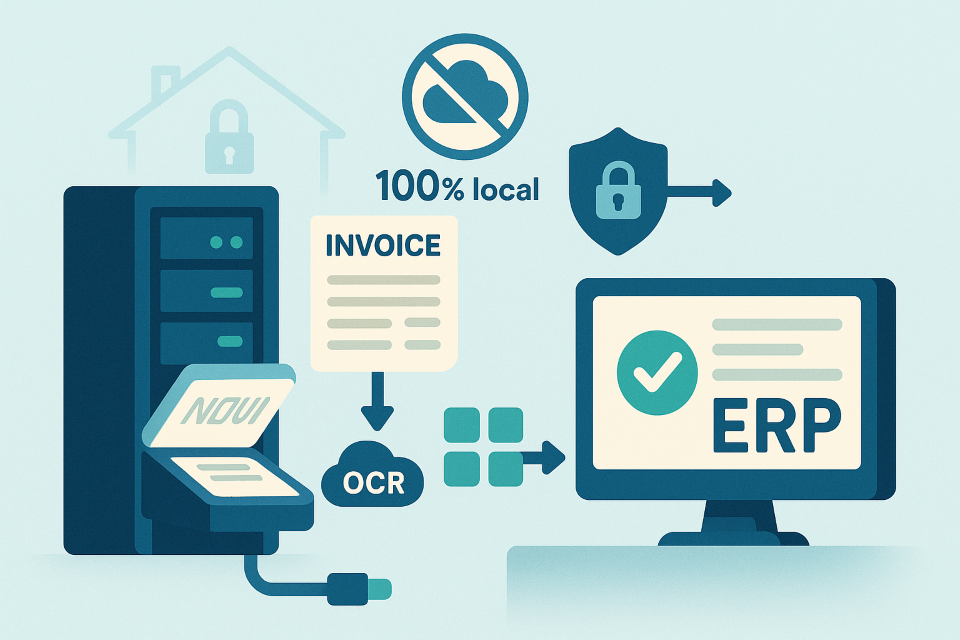
Automate invoice capture without sending a single pixel to the cloud. Our local-first pipeline reads PDFs/photos, extracts headers + line items, validates taxes, and posts clean data straight into your accounting stack.
Who this helps
- Accounting firms & shared service centers: bulk processing with client confidentiality by default.
- Mid-market finance teams (AP/AR): faster month-end close, fewer keying errors.
- Auditors & controllers: traceable, repeatable extraction with audit trails.
- Industries with strict data residency: legal, healthcare, government suppliers.
Why now
- Confidentiality & compliance: PII, banking details, and tax IDs stay on-prem.
- Cost pressure: manual keying and offshore entry are slow and error-prone.
- Format chaos: vendors change templates; email scans and phone photos keep coming.
- Regulations: GDPR, contractual NDAs, and regional data rules favor local processing.
What it does
- Classifies documents (invoice, credit note, receipt).
- Extracts fields (supplier, invoice #, dates, currency, PO, VAT/TVA rates, totals).
- Parses line items (description, quantity, unit price, taxes, discounts).
- Validates math (subtotals ↔ tax ↔ grand total, currency/rounding rules).
- Handles messy inputs (low-res scans, stamps, multi-page, rotated).
- Learns vendors (improves on repeats; no retraining in the cloud).
- Exports to CSV/Excel, APIs, or directly into ERP/accounting (Sage, Odoo, QuickBooks, SAP, etc.).
Languages: Arabic • French • English (mixed locales, multi-currency).
Security & privacy (by design)
- 100% local: OCR, layout, and NLP run on your servers or secure laptops.
- No telemetry by default: opt-in only for metrics you choose to share.
- Access controls: roles, tenants, read/write scopes.
- Audit trails: per-document events, reviewer, changes.
- Data retention: configurable lifetimes; easy purge.
- Compliance support: GDPR principles, least-privilege, data residency.
Results you can expect (illustrative)
- Time per invoice: ↓ 60–80% (e.g., 3–5 min → 45–60 sec with review).
- Straight-through processing (STP): 30–60% for clean vendors/POs.
- Keying errors: ↓ 70–90% through validation + dual-entry checks.
- Confidential data exposure: ↓ ~100% outside your perimeter (local-only).
Your mileage varies by scan quality, vendor variety, and master-data hygiene.
14-day pilot plan (low risk, high clarity)
Week 1 — Connect & baseline
- Pick 500–1,000 recent invoices (PDF + scans) across 20–40 vendors.
- Define gold-standard fields and acceptance thresholds.
- Set integrations (folder watch, email inbox, or API).
- Measure baseline: manual minutes/invoice, errors, rework.
Week 2 — Shadow → go-live (small scope)
- Run local extraction in shadow mode; compare to gold standard.
- Tune field rules (dates, VAT logic, currency, rounding).
- Enable human-in-the-loop review (two-click accept/fix).
- Limited go-live on a subset; produce before/after report.
Data quality checklist (don’t skip)
- PDFs preferred; scans at ≥300 DPI when possible.
- Supplier names normalized; VAT/ICE/IBAN captured in master data.
- Clear tax rules (exempt lines, multi-rate VAT/TVA).
- Currency codes present (ISO 4217).
- PO numbers and vendor IDs consistent with ERP.
Reviewer UI (human-in-the-loop)
- Side-by-side document ↔ fields.
- Keyboard-first corrections; smart suggestions.
- Math panel: tax and rounding explanations.
- One-click export/post to your ERP.
- Flags: duplicates, date anomalies, vendor mismatch, total drift.
Architecture blueprint (reference)
Flow: Ingestion (email/folder/API) → Local OCR & layout → Field + line-item extraction → Validation (math, vendor rules) → Review UI → Export (CSV/API/ERP) → Audit & warehouse.
Components (local)
- OCR & layout engine (multi-lang, table detection).
- Field extractors (regex + ML + rules).
- Validator (currency/tax rules; PO match; duplicate check).
- Review UI (roles/audit).
- Connectors (Sage/Odoo/QuickBooks/CSV).
- Observability (logs/metrics); Governance (RBAC, retention).
Integrations that save time
- Email ingestion (ap@company.com) with smart vendor bucketing.
- Folder watch (network share, SFTP).
- ERP sync for vendors, VAT codes, and POs.
- Webhook/API for posting and status callbacks.
Risks & how we mitigate
- Noisy scans → pre-processing (deskew/denoise), vendor reminders for e-PDFs.
- Vendor variety → on-the-fly templates + learning across repeats.
- Tax complexity → explicit rules per country; tests for edge cases.
- Change management → 1-hour reviewer training; keyboard-centric UI.
Simple ROI frame (illustrative)
Savings ≈ (minutes_saved × hourly_rate × invoices/month)
+ (error_rework_reduction × cost_per_error)
+ (outsourcing_costs_avoided)
Scale when Savings > License + Enablement (hardware you already own).
KPIs to track
- Minutes per invoice (by source: email/scan/PDF).
- STP rate (% posted without edits).
- First-pass yield & rework.
- Duplicate detection hit-rate.
- Reviewer throughput & accuracy.
- Cycle time to post → ledger.
FAQs (short & practical)
Is internet required? No; runs offline.
Can we keep data on-prem? Yes—by default.
Does it learn new layouts? Yes; it improves with repeated vendors.
Does it handle Arabic + French + English? Yes, even on mixed invoices.
How fast to first value? A 14-day pilot with 500–1,000 invoices shows clear results.
Call to action
Start a 14-day local pilot. We’ll connect a sample set, run in shadow mode, then go live on a subset with a before/after report.
TBen Innovation | AI Solutions Team
contact@tbeninnovation.com · www.tbeninnovation.com
Share it!
Continue Reading