



Blog
Latest insights and updates
How Solo Lawyers Can Save 5 Billable Hours a Month

Why 5 Hours Matters (More Than You Think)
For a solo, the hidden leak is micro-tasks: manual time entries, back-and-forth scheduling, re-typing the same paragraphs, chasing signatures, and status updates. At $150–$300/hour, five hours recovered is $750–$1,500 monthly (and much more at premium rates). The goal isn't a big tech overhaul, it's standardizing the 20% of tasks you repeat so the legal 80% gets your focus.
The 5-Hour Plan (Step-by-Step)
1) Capture Every Minute (≈ +60 min/month)
What to do
- Turn on automatic time capture across desktop, email, calendar, and calls.
- Create 3 quick-add entries (e.g., "Client Email," "Doc Review," "Court Filing").
- Approve suggested entries during your weekly power hour.
Why it works
You stop leaking micro-tasks that never make it into invoices.
2) Turn Drafting into Assembly (≈ +90 min/month)
What to do
- Identify your top 3 documents (e.g., engagement letter, fee agreement, demand letter).
- Build templates with variables (client name, dates, fees, jurisdiction).
- Maintain a clause bank (scope, fee structures, venue, confidentiality).
- Add a 1-page style checklist (headers, TOC, signature blocks).
Why it works
From "start-from-scratch" to "assemble and tailor," in minutes.
3) Intake & Scheduling That Run Themselves (≈ +60 min/month)
What to do
- Add a booking link with 2 meeting types (15-min consult, 45-min review).
- Gate with a short intake form that auto-creates a matter and task checklist.
- Enable SMS/email reminders to cut no-shows.
Why it works
Fewer emails, better qualified consults, smoother starts.
4) One-Step E-Signature + Payment (≈ +45 min/month)
What to do
- Bundle e-signature with a payment link in one message.
- Use saved fields (client name, retainer amount, dates) to build packets in ~60 seconds.
Why it works
No more chasing signatures and retainers in separate threads.
5) Canned Emails & Task Checklists (≈ +30–60 min/month)
What to do
- Create 5 canned emails you send repeatedly: follow-up, missing docs, fee agreement + next steps, status update, matter closed.
- Build 2 matter checklists for your most common case types and attach them to matter templates.
Why it works
Consistent client experience, less typing, fewer mistakes.
6) The Weekly Admin Power Hour (≈ +15–30 min saved/month)
Every week, spend 15–20 minutes to:
- Approve suggested time entries
- Re-send any unsigned docs with a one-click nudge
- Close finished tasks and schedule the next client touchpoint
This keeps matters moving and prevents small delays from turning into time sinks.
Two-Week Implementation Sprint (Minimal Disruption)
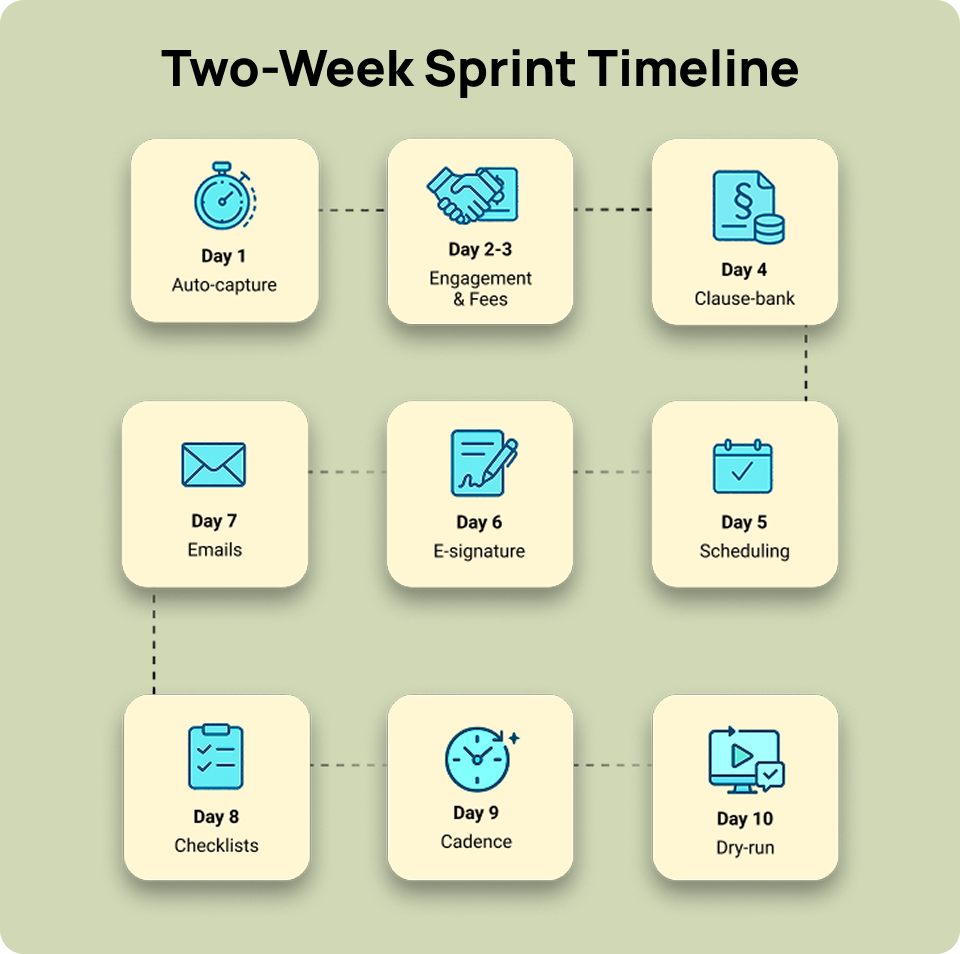
Week 1
- Day 1: Enable automatic time capture; add 3 quick-add entries.
- Day 2-3: Build engagement + fee agreement templates.
- Day 4: Create your clause bank (scope, fees, venue, confidentiality).
- Day 5: Add booking link (+ two meeting types) and connect intake form.
Week 2
- Day 6: Wire e-signature with prefilled fields + payment link.
- Day 7: Draft 5 canned emails.
- Day 8: Create 2 matter checklists; tie them to matter templates.
- Day 9: Schedule the recurring weekly power hour.
- Day 10: Dry-run the full flow on a non-confidential sample.
Build time: ~6–8 hours. Savings: 5–7 hours/month, every month.
Mini ROI Calculator
Monthly ROI = (Hours Saved × Billable Rate – Monthly Tool Cost) / Monthly Tool Cost Break-even Hours = Monthly Tool Cost / Billable Rate
- Example A: Save 5 hours at $200/hr with $60 in tools → ($1,000 – $60)/$60 ≈ 1,567% monthly ROI; break-even ≈ 0.3 hours.
- Example B: Save 6 hours at $300/hr with $90 in tools → ($1,800 – $90)/$90 ≈ 1,900% monthly ROI; break-even ≈ 0.3 hours.
Ethics & Client Protection (Non-Negotiables)
- Confidentiality: Prefer tools that let you keep client data private; disable vendor data-sharing where possible.
- Human review: You remain responsible, always review templated/AI-assisted output.
- Informed consent: Disclose if third-party systems process client information.
- Document control: Keep signed versions, audit trails, and revision histories by matter.
Practice-Specific Quick Wins
Family Law
emplates: retainer, financial disclosures, custody stipulations.
Checklist: filing deadlines, mandatory disclosures, weekly client updates.
Estate Planning
Templates: wills, POA, healthcare directives; clauses for guardians/trusts.
Checklist: assets questionnaire, signing ceremony, funding reminders.
Personal Injury
Templates: medical record requests, demand letters, settlement statements.
Checklist: records retrieval, bill summaries, lien resolution steps.
Immigration
Templates: cover letters, RFE response scaffolds, status updates.
Checklist: forms packet, evidence index, submission timelines.
What to Measure (So the Savings Stick)
- % of time entries created from suggestions
- Docs created from templates vs. from scratch
- Consult → signed engagement → paid retainer time
- No-show and reschedule rates
- Days-to-invoice and days-to-pay
Review monthly; if a metric stalls, simplify the workflow or reduce tools.
Common Pitfalls (And How to Avoid Them)
- Too many tools: Choose a small stack that integrates cleanly.
- No templates: If every document is bespoke, you'll always be pressed for time.
- Skipping reviews: The weekly power hour is the glue, don't skip it.
- Over-automation: Keep judgment calls and nuanced comms human.
Copy-Paste Kit (Use Today)
Canned Email, Consultation Follow-Up
Subject: Next steps for your matter
Hi {ClientName},
Great speaking with you. I've attached the engagement letter. Please sign and pay the retainer via the link inside. Once complete, I will:
- Open your matter
- Send the initial document request
- Share a timeline for first milestones Questions? Just reply here. {YourName}
Canned Email, Missing Documents
Subject: Quick document checklist
Hi {ClientName},
To keep things moving, please upload the items on this checklist: {ChecklistLink}.
If you're missing something, reply with a quick note, and we'll adjust.
Thank you,
{YourName}
Matter Checklist, Template
- Create matter from template
- Add deadlines to calendar
- Send engagement (sign + pay)
- Send initial docs request
- Auto-schedule weekly client update
Clause Bank, Starter Fields
- Scope of services (limited/general)
- Fee structure (flat/hourly/hybrid)
- Confidentiality & privilege
- Venue & governing law
- Termination & refunds
Next Steps
Want this implemented in 14 days with minimal disruption?
→ Book your free 30-min workflow audit and send us 3 pain points + your practice area.
Email: contact@tbeninnovation.com
Share it!
Continue Reading