



Blog
Latest insights and updates
Local-First AI: Speed, Predictable Costs, Privacy by Design
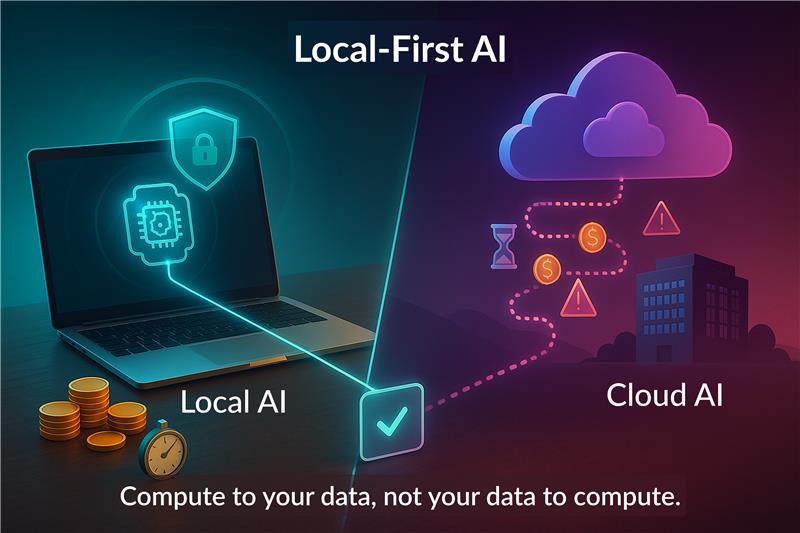
Key Takeaway
Local-first AI runs models on your own devices or private edge servers instead of sending every request to a third-party cloud. The result:
- Low latency: responses in milliseconds to a few hundred ms, even with spotty internet.
- Predictable costs: mostly fixed hardware + occasional updates, not unbounded per-token bills.
- Privacy by design: sensitive data stays with you by default.
- Real use cases today: support assistants, analytics over private files, on-device classification, meeting notes, RAG copilots for teams, without exposing raw data.
What "Local-First" Actually Means
Local-first AI is a deployment philosophy: compute goes to the data, not the other way around.
- On-device: laptops, workstations, mobiles, mini-PCs.
- On-prem / edge: machines you control (office, factory, clinic) close to your users and data.
- Hybrid: local models for the bulk of tasks; optional cloud escalation for rare, heavy jobs.
Principle: Default to local. Explicitly opt in to external calls if and only if needed.
Why It's Fast: Lower Latency by Design
Cloud round-trips, network jitter, and rate limits disappear when inference is local.
- Typical range: ~40-300 ms for small language models (SLMs) and audio classifiers on modern CPUs/GPUs.
- User experience: near-instant suggestions, smooth autocompletion, responsive copilots.
- Operational resilience: if Wi-Fi dips or a VPN slows, your assistant keeps working.
Pattern:
- Use SLMs for interactive steps (summaries, entity extraction, routing).
- Stream partial tokens for immediacy.
- Cache embeddings and prompts locally.
- Batch background work off the critical path.
Why It's Cheaper (and More Predictable)
Cloud LLMs charge per token, per minute, per call. Local-first flips the curve:
- Capex > Opex: invest in hardware once, then amortize.
- Throughput control: you decide how many concurrent requests your device serves.
- No surprise spikes: pilots won't "go viral" into a sudden invoice.
Cost knobs you control:
- Model size (7B vs 70B).
- Quantization (e.g., 4-bit).
- Hardware tier (CPU-only vs consumer GPU).
- Caching + reuse of embeddings.
Privacy by Design (Without Extra Bureaucracy)
When data doesn't leave your environment by default:
- Lower exposure surface for leaks or unintended sharing.
- Clear auditability: you can log exactly what ran, when, and on which machine.
- Easier approvals: fewer external processors in the loop.
Good practices:
- Keep zero default telemetry; add explicit, reversible opt-ins.
- Redact or hash identifiers before any optional external call.
- Maintain local prompt & output logs for traceability (encrypted at rest).
- Provide a kill-switch: "Never send data off this device."
Concrete Use Cases You Can Ship Now
1. Private File Copilot (Desktop / Team)
Ask: "Summarize the latest supplier contract" or "Compare Q2 vs Q3 invoices."
Stack: local embedding model + vector store (on disk) + small chat model.
Outcome: answers in seconds, no document leaves the device.
2. On-Device Sales Notes & Call Summaries
Run lightweight ASR + summarization locally on a laptop after a meeting.
Sync only the summary to your CRM—not the raw recording.
3. Field-Ops Classifier (Factory / Retail)
Classify incidents, defects, or shelf photos on a rugged tablet.
Works offline; sync decisions later.
4. Support Reply Drafts (Internal Knowledge)
Retrieve solutions from your own wiki; draft responses locally.
Optional escalation to a bigger remote model for rare edge cases.
5. Meeting Copilot (On-Prem)
Transcribe, tag topics, action items—edge server only, no cloud hop.
Reference Architecture (Local-First, Hybrid-Optional)
Core components:
- SLM for chat (e.g., 3-8B params, quantized).
- Embedding model for retrieval (local vector DB).
- RAG pipeline: chunker → embed → retrieve → synthesize.
- Policy engine: what's allowed to leave the device (default: nothing).
Optional escalations:
- Pattern A: "Ask a bigger remote model only when confidence is low."
- Pattern B: "Strip sensitive spans, send a minimal abstract."
- Pattern C: "Operator approval pop-up before any external call."
Observability:
- Local logs (prompts, citations) → encrypted storage.
- Lightweight dashboards to monitor latency, hit-rates, cache, escalations.
Model & Hardware Sizing (Practical Guide)
- Text tasks (routing, labels, short summaries): 3-8B SLM, 4-bit quantized; CPU or entry-level GPU.
- RAG over PDFs/Docs: SLM for synthesis + local embedding index; SSD speed matters.
- Speech tasks: small on-device ASR for meetings; batch heavy diarization after hours.
- Vision (classification, OCR): favor distilled/quantized models; edge GPU optional.
Tip: Start small. If answers are too shallow, scale context (RAG quality) before model size.
Implementation Checklist
Phase 0 - Pilot (1-2 weeks)
- Pick 1 use case with clear success criteria.
- Load 50-200 real documents; build a tiny RAG.
- Ship a desktop or internal web app to 3-5 power users.
Phase 1 - Hardening
- Add streaming, retries, local caching.
- Implement redaction rules + escalation approvals.
- Measure latency, exact-match rate, user satisfaction.
Phase 2 - Scale Carefully
- Move to an edge box for team access.
- Automate ingestion (file watchers, CRM sync).
- Add admin controls: model switcher, index rebuild, audit viewer.
KPIs That Matter
- Latency (P95) for key actions.
- First-token time (perceived speed).
- RAG hit-rate / citation coverage.
- Escalation rate to any external service.
- Cost per 1,000 queries (all-in).
- User-reported trust (did the answer use the right sources?).
Risks & How to De-Risk
- Model quality too low? Improve chunking, retrieval, and prompts before upgrading model size.
- Hardware mismatch? Profile real workloads; start with consumer GPU or CPU-only and iterate.
- Shadow copying to tools? Disable auto-syncs; whitelist only what's required.
- Maintenance overhead? Use containerized runtimes and versioned model bundles.
Mini Case Snapshots
- Finance team: local contract summarizer → reduced review time by ~60%, zero external sharing.
- Clinic front-desk: on-device triage helper for FAQs → consistent answers while staying offline.
- Field sales: laptop copilot drafts meeting notes instantly → better CRM hygiene, no bandwidth stress.
(Illustrative outcomes; your mileage will vary.)
FAQ
Is local-first "all or nothing"?
No. Keep 90-95% local; escalate only for the rare, complex prompts—with approval.
Can we still use our favorite cloud tools?
Yes—treat them as optional plug-ins. Local remains the default path.
What about updates?
Ship signed model/app bundles. Users can update offline or via your internal package server.
How to Start This Month (Playbook)
- Choose one workflow where speed and privacy really matter.
- Prototype with a small, quantized model + local RAG.
- Instrument for latency, citations, and user feedback.
- Decide escalation rules (when, how, and what to redact).
- Harden & roll out to the next 20 users.
Share it!
Continue Reading